
You bought a Ledger Nano S, it can be first or second hand, or perhaps you found one that you have not used for years. How can you be sure it is a real Ledger device?
The case, the logo and even the box are not enough to answer that question. A counterfeit can imitate all three. Fortunately, Ledger provides a cryptographic verification designed to check the authenticity of the secure chip inside the wallet. In this guide, we’ll go through how to check whether your original Ledger Nano S is genuine, from the packaging and first startup to Ledger’s Genuine Check. No electronics expertise is needed for the main checks. This guide is about the original Ledger Nano S, not the Nano S Plus or Nano X.
First, a useful distinction: genuine means the device can prove that it contains an authentic Ledger Secure Element. It does not necessarily mean the complete hardware has never been modified. If your main concern is an added chip, unusual wires or an altered screen, see our separate guide: How to Check if Your Ledger Nano S Has Been Tampered With.
Quick checklist: Is my Ledger Nano S genuine?
- Confirm who sold you the device and keep the purchase information.
- Inspect the box and look for unexpected instructions or accessories.
- For a new device, confirm that the recovery sheet contains no prewritten words.
- Set up the wallet yourself and choose your own PIN.
- Download Ledger’s official application from Ledger’s website.
- Connect your Nano S and complete the Genuine Check successfully.
The last step is the actual cryptographic authentication. The other steps help you detect common scams, but they do not substitute for it.
1. Check where your Ledger Nano S came from
Start with the simplest question: who sold you the device?
Whenever possible buy directly from Ledger.com or from an authorized reseller, Be aware that even if buying from an authorized seller reduces the number of unknown parties between the factory and the customer there is still a risk of supply chain attacks. For this reason, we strongly recommend buying your Ledger device directly from Ledger rather than through third-party sellers, including authorized resellers. While ordering directly from Ledger does not completely eliminate the possibility of a shipment being intercepted and the device being tampered with, it significantly reduces the number of intermediaries involved and therefore the opportunities for tampering. This is particularly important for a hardware wallet, because a malicious modification could happen before the product reaches its owner.
The original Ledger Nano S has been discontinued. Ledger’s device policy lists its end-of-life date as June 2022. So if you are buying one today, it is especially important to establish whether it is old stock, refurbished, previously used, or sold through an independent marketplace.
A reseller’s reputation is relevant, but it is not a technical guarantee. In October 2026, Ledger confirmed finding an unauthorized hardware implant in at least one device associated with the CryptoBilis reseller investigation. As of today at least about 100 devices appeared to be involved in this case. That does notestablish that the original Nano S was affected. The event shows why a trustworthy sales channel remains important even when a device is cryptographically genuine. We explain physical alterations in a separate Nano S tampering guide.
When buying through a marketplace, check the actual seller displayed at checkout. A product page can contain offers from several merchants, even when the productdescription looks official. If you have a receipt, keep it with the device’s purchase records.
Our advice: Establish the history of any second-hand Ledger Nano S and verify its Secure Element using Ledger’s official application. If you are not comfortable inspecting the device for signs of physical tampering, we strongly recommend against using it.
2. Examine the box and its contents
A box with a convincing Ledger logo proves very little by itself. Boxes, sleeves, printed cards and shrink-wrap can all be reproduced. Likewise, a damaged box does not automatically mean a device has been attacked. The original package could include the device, a USB cable, a keychain or
lanyard, introductory cards and one or more blank recovery sheets. The precise presentation can differ between manufacturing batches and product bundles.

Compare the contents with what the seller advertised, especially if an extra instruction sheet asks you to visit an unfamiliar website, install an application from a QR code, or restore a wallet using supplied words.
Ledger’s own documentation explains that it does not rely on a tamper-proof security sticker as proof of device integrity. Such seals can be copied. The condition of the packaging is a warning signal, not a definitive authenticity test.
3. Make sure the recovery phrase was not provided in advance
This is one of the easiest scams to recognize, and one of the most dangerous. A Ledger Nano S normally generates a recovery phrase during setup, displaying the words on the device itself. Those words are the backup to the wallet’s private keys. Anyone who knows them may be able to restore the wallet and transfer its
cryptocurrency.
An attacker can therefore prepare a recovery phrase, keep a copy, and include those words in the box. The victim thinks the wallet is ready to use. After funds arrive, the attacker already has what is needed to access them. For a new Nano S, check that the recovery sheet is blank and that no seller-supplied paper, email, website or application
provides your secret words.

The distinction for existing owners is simple: a recovery sheet you filled out yourself when you originally initialized the device is normal. A recovery phrase prepared by somebody else is not. Never type your recovery phrase into a computer, a website, a browser extension or a mobile application to verify that a Ledger is genuine. The hardware wallet is meant to keep that secret away from those environments.
4. Check the first-start behavior and PIN setup
When a new, uninitialized Nano S is connected to a USB power source, it should enter the onboarding process. You should see a Welcome and Press both buttons to begin screens. You then choose your own PIN and initialize the wallet.


If a purportedly new wallet arrives already configured with a PIN that the seller gave you, that is a serious red flag. The same applies if an accompanying note claims you must use a particular PIN to activate the product. A previously used Nano S may legitimately ask for an existing PIN, so an unexpected PIN prompt does not, by itself,
demonstrate a counterfeit. It does mean that the device is not in the unused initial state you expected. Clarify its historybefore trusting it.
Also remember that a malicious device or modified firmware could imitate an onboarding screen. The startup screens are a useful check, but not the final one.
5. Run the Ledger Genuine Check
This is the most important software-based authenticity test.
Ledger’s Genuine Check is a cryptographic authentication process. The Ledger Wallet application challenges the Secure Element inside the hardware wallet. The chip responds using cryptographic credentials installed during manufacturing, and Ledger’s verification infrastructure checks the result.
In simple terms, the test asks: does this device contain a Secure Element that Ledger recognizes as genuine?
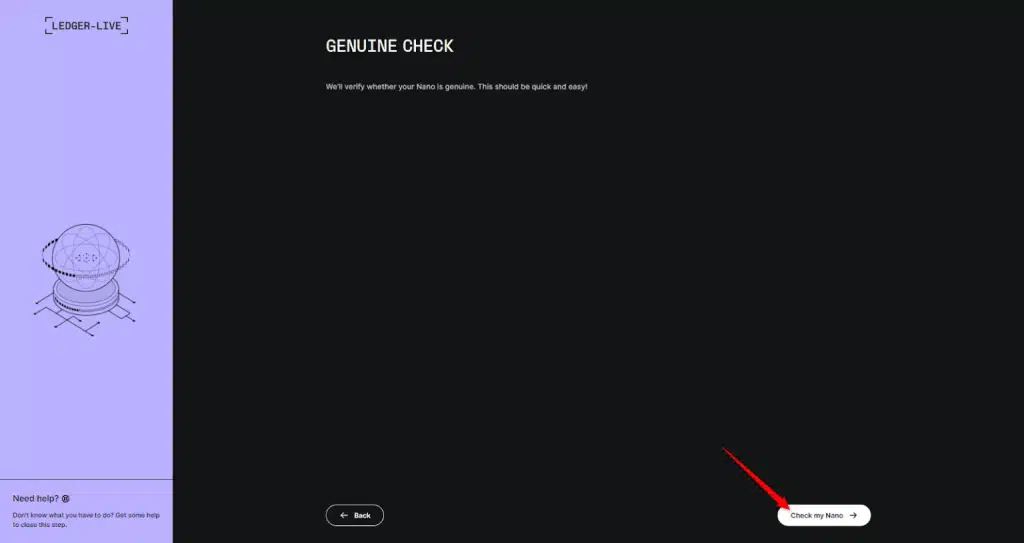
How to perform the check
- Navigate to ledger.com yourself and follow Ledger’s official download instructions for Ledger Wallet (previously Ledger Live).
- Install and open the application obtained through that official channel.
- Connect your original Nano S using a suitable USB cable.
- Follow the application’s device connection and authenticity-check prompts; the precise screens depend on thesoftware and device firmware.
- Read the result before adding funds or approving transactions.
If the Genuine Check fails, or the application cannot complete it, verify your software source, check the USB connection and follow Ledger Support guidance. A connection or compatibility error alone is not proof of a counterfeit. However, only a successful cryptographic verification provides a positive genuineness result.
What a successful result actually proves
It provides cryptographic evidence that the device contains a genuine Ledger Secure Element. That is valuable, and far more meaningful than a serial-number sticker or a convincing box.
However, it cannot establish that nobody has added components around the genuine chip. Ledger explicitly acknowledges this limitation in its genuineness threat model.
That is a separate concern. Our hardware tampering guide covers PCB photos, board revisions and suspicious extra components. The most important step on this page is the official cryptographic check.
6. Example: fake Ledger replacement devices sent by mail
In June 2021, researchers and journalists documented a scheme involving unsolicited Ledger Nano X devices sent to wallet
owners. The parcel appeared official and included a letter presenting the device as a replacement following a data-security
incident.
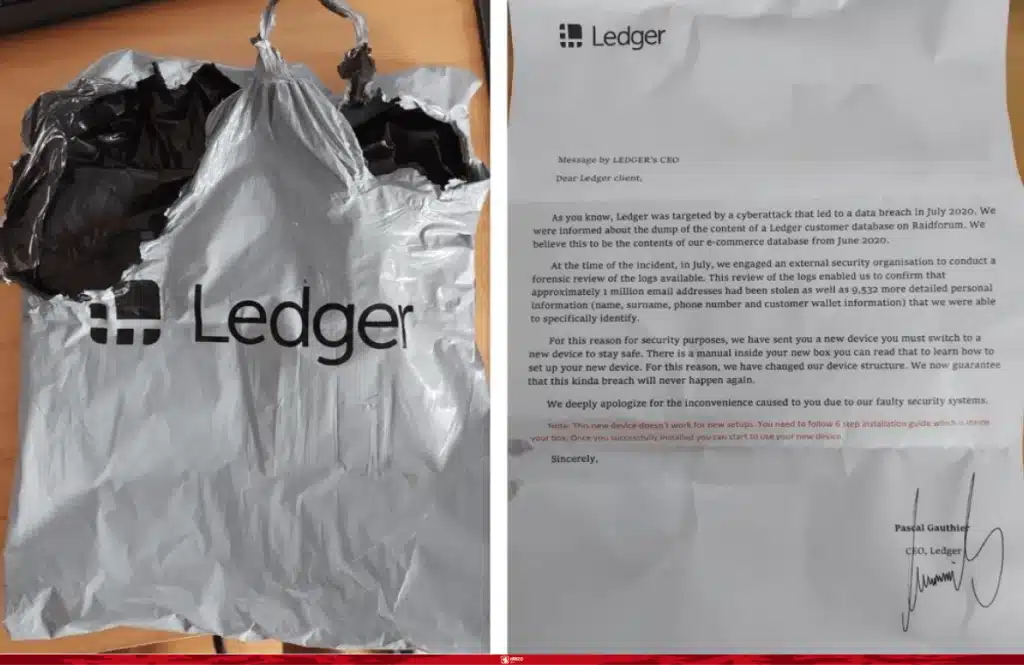
The modified device contained a concealed USB storage component intended to lead the owner toward malicious software and a request for recovery words. This was not evidence of the Nano S being modified in the same way; it illustrates why professional-looking branding and an apparently free replacement cannot establish trust.
7. What about serial numbers, stickers and the Ledger logo?
A convincing logo or a professional-looking serial label tells you very little about the electronic components inside a wallet. These details can be copied. Ledger’s security team also explains that conventional tamper-evident seals can be replicated or bypassed, which is why they are not its principal authenticity mechanism.
The same goes for packaging quality. Small differences between production batches are possible, and an opened box is a reason to investigate, not a reliable way to identify a particular counterfeit.
If you are deciding between a visual inspection and the software check, give priority to the official Genuine Check. It authenticates the Secure Element using cryptography, rather than relying on the appearance of printed materials.
8. What if the Genuine Check does not work?
Start by separating failed authentication from a failure to connect:
| What happens | What it tells you | Sensible next step |
| Genuine Check succeeds in official Ledger software | The secure element has been authenticated | Continue with normal security checks. Assess physical tempering separately if relevant. |
| Application cannot find the Nano S | No authenticity result yet | Check the USB cable, USB access and application compatibility |
| Application reports a genuineness failure | Authentication has not succeeded | Keep the device unused and contact official Ledger Support |
| Device asks for a PIN supplied by the seller | Device is not in an expected new-device state | Investigate the seller and device history before putting assets at risk |
| Recovery phrase was supplied on paper or digitally | Someone else know the wallet’s keys | Treat the supplied phrase as compromised and use a newly generated phrase on a trusted device |
9. Frequently asked questions
How can I verify my Ledger Nano S is genuine?
Use the official Ledger Wallet application obtained through Ledger’s website and complete its Genuine Check. The process cryptographically verifies the Secure Element rather than relying on the case or packaging.
Can a fake Ledger Nano S pass the official Genuine Check?
A fully counterfeit device without valid Ledger device credentials should fail the real cryptographic verification. A convincing fake application might claim otherwise, which is why the software source matters. A device containing a genuine Secure Element can also pass while other components have been physically altered; that is a separate tampering risk.
My Nano S has a different color circuit board. Is it fake?
Not necessarily. The Nano S has multiple documented genuine PCB revisions, including green and blue boards. They are illustrated in our Nano S hardware inspection guide.
Can I use a second-hand Ledger Nano S?
A used Nano S can contain a genuine Ledger Secure Element, but an unknown previous owner makes its history harder to establish. Verify the device with Ledger’s software, generate a new recovery phrase on a trusted device before receiving funds and consider the risk of physical modification independently.
Does a blank recovery sheet prove authenticity?
No. It helps rule out one common pre-seeding scam, but a counterfeit can also include a blank sheet. The official Genuine Check is required for chip authentication.
Is the Ledger Nano S still supported?
The original Nano S is an end-of-life product, with an EOL date of June 2022 according to Ledger’s published policy. That said actual app and firmware are still compatible with latest Ledger Live version.
If you have been using a Ledger Nano S for years without any issues, it has passed Ledger’s Genuine Check, and you have verified that it has not been physically tampered with, it could still be one of your most trusted hardware wallets. At Symetronix, we do not recommend upgrading simply for the sake of upgrading, especially if you cannot purchase your new Ledger device directly from ledger.com.